Running a fashion brand means juggling wholesale orders, DTC sales, marketplace listings, and returns—often across systems that don’t talk to each other. When peak season hits, one inventory mismatch can spiral into oversells, angry customers, and eroded margins. That’s where smart ERP integration comes in.
This guide provides five practical takeaways focused on workflows, data mapping, and achieving a fast return on investment (ROI). You’ll learn how to prevent oversells, build efficient returns processes, handle partial order shipments, map critical data fields, and choose a cost-effective connector like Blastramp to shorten timelines and lower costs.
Essential ERP Integration Tips for Growing Fashion Brands
Enterprise resource planning (ERP) integration for fashion brands must solve industry-specific challenges like inventory accuracy, returns, partial shipments, and tight budgets for brands under $20M. Here are five takeaways that prioritize practical workflows, clear data mapping, and a quick path to ROI.
- Stop oversells with real-time, channel-aware inventory sync: Use integration tools to sync inventory between your ERP, warehouse (WMS), Shopify, and other sales channels. This prevents overselling and underselling by setting smart allocation rules and safety stock levels.
- Build returns-first ERP workflows to protect margins: Design your ERP to handle returns, inspections, and restocking efficiently. This ensures refunds and inventory updates happen automatically, without manual data entry.
- Treat partial order releases as a native process, not an exception: Set up your system to automatically handle split shipments and backorders. This includes sending partial invoices and keeping customers updated.
- Map the right fashion fields to avoid rework: Before you start, make sure critical details like style, size, color, and season are mapped correctly across all your systems to avoid data gaps later.
- Pick a pre-built, cost-sensitive connector to speed up ROI: For brands under $20M, choose an affordable, fashion-focused connector like Blastramp. It offers pre-configured setups for Shopify, QuickBooks, and other tools, reducing costs and timelines.
Why ERP Integration is Different in Fashion
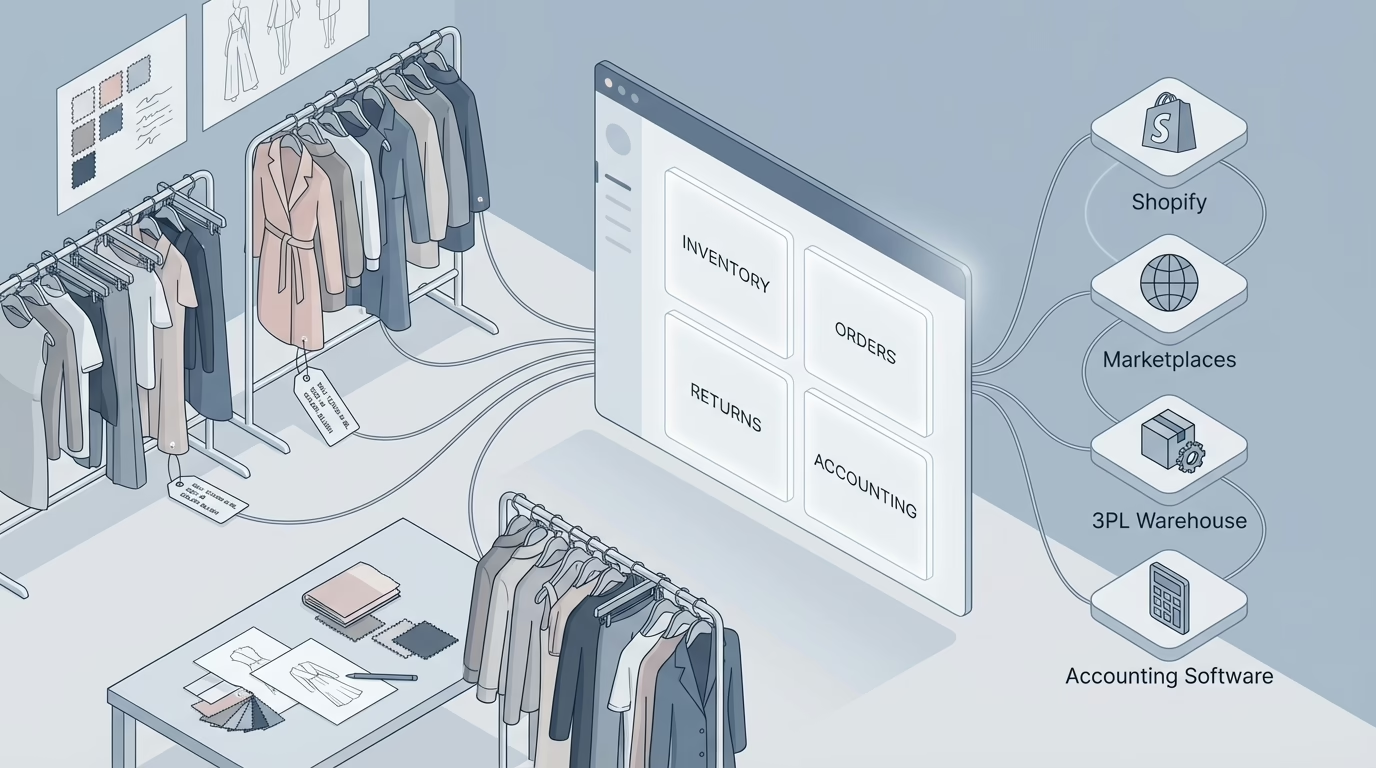
ERP integration connects your key systems—like your ERP, WMS, e-commerce platform, and accounting software—so that product availability, orders, and financials stay aligned. For fashion brands, this means fewer oversells, faster restocking of returned items, accurate accounting, and inventory levels that are aware of each sales channel.
- The Core Problems: High return rates, fluctuating demand for different items, multiple sales channels, and frequent split shipments create data headaches and unhappy customers.
- What “Good” Looks Like: A successful integration provides channel-aware inventory, a single source of truth for each data type, automated returns processing, and native handling of partial shipments, all of which reduce customer service issues.
ERP Integration Architecture for Fashion Brands
A typical fashion brand uses 3-5 core systems (ERP, WMS, e-commerce, accounting, returns). Most integration failures—around 60-80%—happen because it’s not clear which system is the master record for different types of data.
- Assign a Source of Truth (SOR): Decide upfront which system owns which data. For example, your ERP might be the SOR for financial data, while your WMS manages inventory counts, and Shopify handles customer orders.
- Choose Your Integration Method:
- API-First: Offers maximum control but requires more development.
- Middleware: Centralizes data transformations but can be complex.
- Pre-built Connectors: Fastest to deploy for standard workflows.
- Real-Time Synchronization: For the most accurate inventory, use real-time syncs (like webhooks). Older systems may need scheduled updates instead.
1. Stop Oversells with Real-Time, Channel-Aware Inventory Sync
To avoid selling items you don’t have, your inventory levels should be managed by channel, not as one single pool.
- Allocation Logic: Set different inventory buffers for each channel. For example, reserve more stock for Amazon to meet its strict shipping SLAs, and a different amount for your own website.
- Multi-Location Inventory: If you have multiple warehouses, manage inventory separately for each to prevent cross-location oversells.
- 3PL and Dropship Feeds: Ensure inventory feeds from third-party logistics (3PL) partners are standardized and monitored for accuracy.
2. Build Returns-First ERP Workflows to Protect Margins
With returns making up 10–30% of apparel orders, efficient processing is key. Shaving even a few days off your return-to-stock time improves margin recovery.
- Automate the RMA Lifecycle: The process—from issuing an RMA to inspecting the item and restocking it—should be automated in your ERP to create credit memos and update inventory without manual work.
- Track Resale Readiness: Use condition codes to track whether a returned item can be resold, needs reconditioning, or should be written off. This helps you calculate its resale price and location.
3. Treat Partial Order Releases as a Native Process
Partial shipments can reduce order cancellations by 10–20% during stockouts. Your system should handle them automatically.
- Split Shipments and Backorders: Define rules to ship available items immediately while creating a backorder for the rest, with a clear estimated time of arrival (ETA).
- Partial Invoicing and Notifications: Automatically generate partial invoices and send customers status updates for each shipment to reduce “Where is my order?” inquiries.
4. Map the Right Data to Avoid Rework
Over 70% of issues after an integration goes live are due to missing or mismatched data.
- Product and Variant Hierarchy: Before you begin, lock down your product data, including style, size, color, season, and other attributes.
- Order and Fulfillment States: Ensure all systems use the same terms for order statuses (e.g., “Received,” “Picking,” “Shipped”).
- Financial and Channel IDs: Map fields like payment details, tax codes, refund reasons, and marketplace-specific identifiers (like ASINs) from the start.
5. Choose Integrations That Matter: Shopify, QuickBooks, WMS, and 3PLs
Pre-built connectors can shorten integration timelines from months to weeks.
- Shopify and Marketplaces: Push orders to your WMS and sync financial settlements and refunds back to your ERP or QuickBooks.
- Accounting (QuickBooks): Map sales, fees, and refunds to the correct general ledger (GL) accounts.
- WMS and 3PLs: Sync inventory levels, purchase order receipts, and shipment confirmations.
Step-by-Step ERP Integration Plan
A connector-led project typically takes 4–8 weeks and can cut service costs by 30–50%.
- Discovery: List your sales channels, order volumes, 3PLs, and any unique scenarios.
- Source-of-Truth Decisions: Declare the master system for product, inventory, order, and financial data.
- Connector Selection: Choose a connector and set up a test environment (sandbox).
- Data Mapping: Lock in all data fields and transformation rules.
- Integration Build: Configure the connection points and error handling.
- Testing: Run tests for fulfillment, partial shipments, and returns using realistic data.
- Go-Live: Use a detailed runbook for a smooth launch, followed by 2–4 weeks of close monitoring.
Costs, Timeline, and Fast Path to ROI
Brands with under $20M in revenue often prefer subscription-based connectors with low setup fees. The ROI is often visible within one or two inventory turns from reduced oversells and faster returns processing.
- How to Evaluate Connectors: Look for fashion-specific features and pre-mapped fields, which dramatically reduce setup time. An error dashboard with easy retry options is also a major plus.
- Myth-Buster: Don’t delay handling returns and partial shipments to “phase two.” This only defers the hardest parts and leads to expensive rework.
Blastramp Snapshot: An Affordable Connector + WMS for Fashion
Blastramp offers a WMS and affordable connector designed for fashion brands, with pricing starting at $750/month. Its built-in handling of partials and returns reduces manual work. With pre-mapped apparel fields, it offers a quick path to demonstrating value.
Common Questions
- What are the benefits of ERP integration for apparel inventory?
It prevents oversells, speeds up returns, centralizes accounting, and provides channel-aware inventory—all of which protect your margins. - How do you integrate an ERP with Shopify, QuickBooks, and a WMS?
A connector-led approach is fastest. You map data fields, configure the connections, and test key workflows like orders, returns, and partial shipments in a sandbox. - What’s the timeline and cost?
Connector-led projects typically take 4–8 weeks with a subscription fee. Custom projects can take months and cost significantly more. - Can it handle partials and returns?
Yes, if your system has built-in workflows for them. If not, expect manual reconciliation.
Final Thoughts
ERP integration in fashion succeeds when it’s designed for the industry’s realities: high returns, volatile demand, and multi-channel sales. By prioritizing clear data ownership, returns-first workflows, and native partial-release handling, you can cut oversells, get products back in stock faster, and protect your margins.
Ready to stop chasing reconciliation errors and start reclaiming your margins?