
Fashion brands do not outgrow spreadsheets all at once. First, Shopify stock gets out of sync with wholesale orders. Then a retailer wants a large size run while DTC customers are buying the same units. Soon your team is checking POs, 3PL updates, returns, and QuickBooks by hand just to know what is truly sellable.
Wholesale distribution software gives apparel brands one place to manage B2B wholesale, DTC inventory, incoming stock, fulfillment handoff, returns, and accounting connections. Blastramp is built for growing fashion and apparel brands that need more control than Shopify and spreadsheets can provide, without taking on a heavy ERP project too early.
Key Takeaways
- Wholesale distribution software helps apparel brands manage B2B wholesale and DTC demand from one inventory source.
- The biggest win is allocation control: reserve units by channel, account, size run, warehouse, or sales priority before overselling starts.
- Blastramp fits brands that need more than Shopify and spreadsheets, but are not ready for a large ERP rollout.
- For fashion teams, the right system should connect order entry, customer pricing, purchase orders, incoming stock, warehouse or 3PL handoff, returns, and QuickBooks/accounting.
- Keep the current WMS and ERP comparison, but sharpen the message: WMS handles warehouse execution; ERP handles broad company records; Blastramp HQ manages the commerce and inventory logic between them
What is Wholesale Distribution Software?
Wholesale distribution software is the operating layer that connects inventory, wholesale orders, DTC orders, purchase orders, fulfillment, returns, and accounting. For apparel brands, that means knowing which sizes are available, which units are reserved for retail partners, which purchase orders are incoming, and which orders can ship now.
A fashion brand selling through Shopify, JOOR, NuOrder, Brandboom, a 3PL, and wholesale reps cannot rely on one channel’s inventory count. The system needs to answer a harder question: what stock is actually available to promise after wholesale commitments, safety stock, returns, and incoming POs are considered?
Blastramp HQ is designed for that middle stage of growth. It gives brands a single inventory and order hub before the team is forced into extra admin hires or a large ERP project.
Wholesale Distribution Software vs. WMS
A Warehouse Management System (WMS) is focused on optimizing physical warehouse operations. It improves the efficiency of picking, packing, and shipping orders and increases labor accuracy. While valuable, a WMS doesn’t manage the complexities of multi-channel sales.
In contrast, wholesale distributor software manages the business logic. It handles order rules, allocates inventory to specific channels or customers, and controls the entire journey of an order. For many mid-market brands, connecting Shopify, QuickBooks, and a 3PL through a distribution platform is a faster and more effective solution.
A WMS manages warehouse work: receiving, bin locations, picking, packing, shipping, and labor flow. Wholesale distribution software manages the business rules before and after the warehouse touchpoint.
For example, Blastramp HQ can decide which units are sellable, which units are reserved for a wholesale account, which backordered items can be released, and which order should move to the 3PL. Blastramp WMS can then support the warehouse execution side when the brand needs deeper fulfillment control.
Wholesale Distribution Software vs. ERP
An Enterprise Resource Planning (ERP) system is a massive suite that handles a company’s core financial data and other master records. However, ERP projects are often long, complex, and expensive. Wholesale distribution software offers a more agile approach, providing the essential channel management and order rules you need without the cost and complexity of a full ERP overhaul.
An ERP is built to manage broad company records across finance, operations, procurement, and reporting. It can make sense for larger teams with complex finance requirements and the budget for a longer rollout.
Many apparel brands under $20M need something more focused first: inventory accuracy, channel allocation, wholesale order control, purchase order visibility, and accounting connections. Wholesale distribution software can give the operations team that control without turning a stock problem into a company-wide ERP project.
Who This Is For
This page is for growing apparel brands that are past the “Shopify plus spreadsheets” stage, but not ready to spend months rebuilding the whole business around an ERP.
Blastramp is a strong fit when:
- Annual sales are under roughly $20M, with both B2B wholesale and DTC orders in motion.
- The team sells through Shopify plus retail partners, marketplaces, sales reps, or B2B platforms.
- Stock is split across warehouses, a 3PL, incoming POs, returns, or reserved wholesale allocations.
- Customer-specific pricing, catalogs, payment terms, or order minimums are getting harder to manage by hand.
- Leadership needs better reporting without hiring more admin staff to reconcile spreadsheets.
If your team is still selling a small catalog from one warehouse, basic tools may be enough. If your team is already arguing over which channel “owns” the last units in a size run, it is time to compare wholesale distribution software.
Stop Overselling with a Single Source of Truth
The biggest benefit of dedicated distribution software is its ability to prevent overselling. It achieves this by unifying inventory across all channels, reserving stock for key accounts, and automatically updating availability in near real-time.
Here’s how it works:
- Real-time inventory sync: Update stock across wholesale, DTC, marketplace, and fulfillment channels when orders, returns, or receiving events happen.
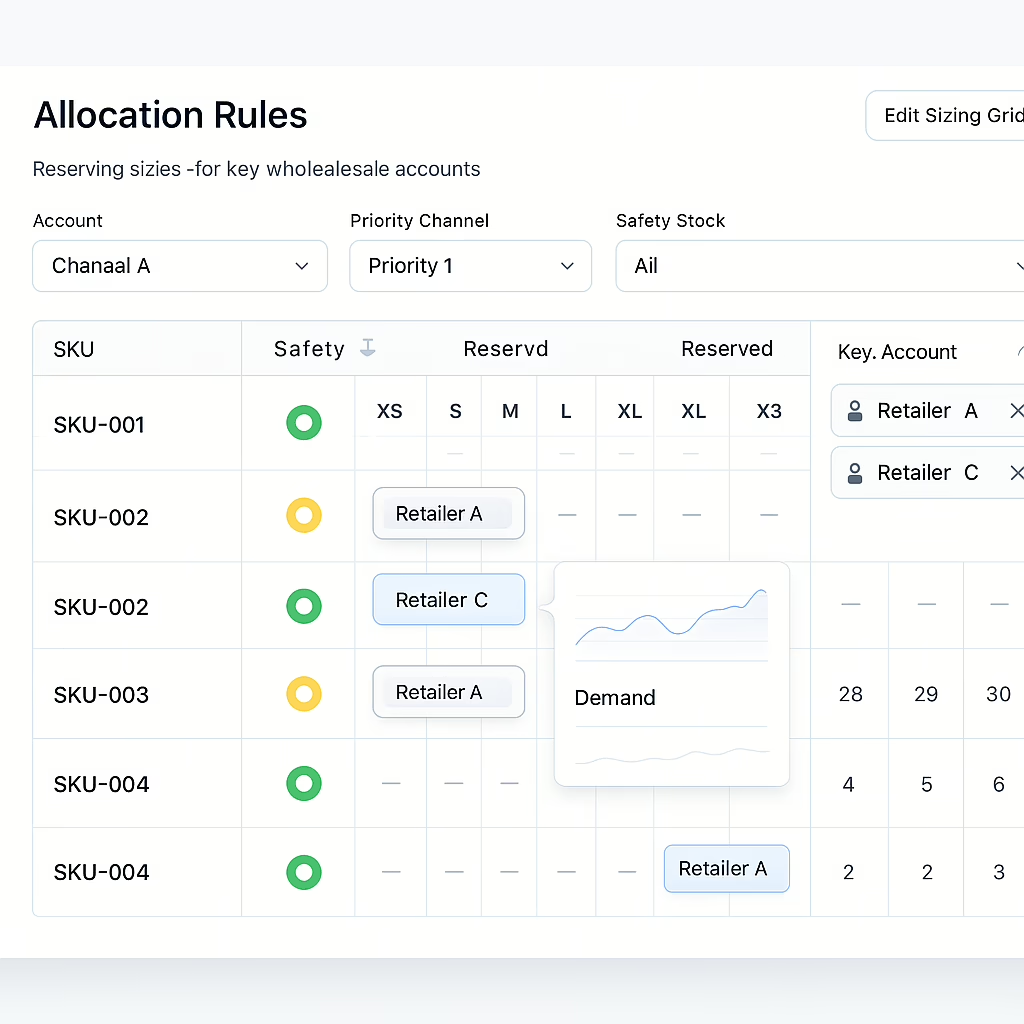
- Allocation rules: Reserve stock for priority accounts, launch periods, DTC safety stock, or specific size/color runs.
- Available-to-promise logic: Show what can be sold now based on on-hand stock, committed units, backorders, incoming POs, and channel rules.
- Partial order releases: Ship available items now and hold the rest for later, instead of delaying the whole wholesale order.
- Returns-to-restock flow: Move approved returns back into sellable inventory faster so the stock can be reallocated where demand is highest.
Apparel teams feel this most during launches and promotions. A jacket in black, size medium, may be sitting in five different promises at once: a Shopify cart, a wholesale preorder, a safety stock rule, a pending return, and a PO that has not landed yet. The software has to show the truth before someone sells what is already committed.
| Workflow | What the Software Should Handle | Why It Matters for Apparel Brands |
|---|---|---|
| Order Entry | B2B orders, rep orders, marketplace orders, DTC orders | Keeps wholesale and online demand from fighting over the same units |
| Customer Pricing and Catalogs | Account-specific pricing, order minimums, terms, and product access | Lets sales teams support retail partners without manual price sheets |
| Allocation | Reservations by channel, account, warehouse, launch, or SKU group | Protects key wholesale commitments while DTC orders keep moving |
| Available-to-Promise | On-hand stock, incoming POs, backorders, returns, and safety stock | Shows what can be sold before the warehouse ships it |
| Purchase Orders and Incoming Stock | Supplier POs, delivery timing, partial receipts, and landed inventory | Helps teams plan sellable inventory before goods arrive |
| Warehouse and 3PL Handoff | Routing rules, pick/pack/ship flow, ShipStation, 3PL, or WMS links | Reduces hand-keyed fulfillment work and order delays |
| Returns | RMA flow, return approval, restock timing, credit memo support | Gets returned stock back into the right pool faster |
| Accounting | QuickBooks/accounting sync, invoices, credit memos, payment status | Keeps operations and finance working from the same order data |
Order Entry
What it handles: B2B orders, rep orders, marketplace orders, DTC orders
Why it matters: Keeps wholesale and online demand from fighting over the same units
Customer Pricing and Catalogs
What it handles: Account-specific pricing, order minimums, terms, and product access
Why it matters: Lets sales teams support retail partners without manual price sheets
Allocation
What it handles: Reservations by channel, account, warehouse, launch, or SKU group
Why it matters: Protects key wholesale commitments while DTC orders keep moving
Available-to-Promise
What it handles: On-hand stock, incoming POs, backorders, returns, and safety stock
Why it matters: Shows what can be sold before the warehouse ships it
Purchase Orders and Incoming Stock
What it handles: Supplier POs, delivery timing, partial receipts, and landed inventory
Why it matters: Helps teams plan sellable inventory before goods arrive
Warehouse and 3PL Handoff
What it handles: Routing rules, pick/pack/ship flow, ShipStation, 3PL, or WMS links
Why it matters: Reduces hand-keyed fulfillment work and order delays
Returns
What it handles: RMA flow, return approval, restock timing, credit memo support
Why it matters: Gets returned stock back into the right pool faster
Accounting
What it handles: QuickBooks/accounting sync, invoices, credit memos, payment status
Why it matters: Keeps operations and finance working from the same order data
Commerce-First Workflows: From PO to Cash
Wholesale distribution software should cover the full path from planned inventory to paid invoice.
A practical apparel workflow looks like this:
- Create supplier POs by style, color, and size.
- Track incoming stock and expected delivery dates.
- Reserve units for wholesale accounts, DTC demand, or launch rules.
- Accept wholesale orders with the correct pricing, terms, and catalog access.
- Release full or partial orders to the warehouse, 3PL, or WMS.
- Sync invoices, credits, and order data back to QuickBooks or accounting.
- Restock approved returns and make those units available again.
This matters because revenue can be trapped at several points. Stock may be on order but not sellable. A wholesale order may be approved but waiting on one size. Returns may be physically back in the building but not visible to sales. The right system shortens those gaps so teams can ship, invoice, and restock with less manual cleanup.
Integrations That Keep Your Business Flowing
Wholesale distribution software is only useful if it connects with the systems your team already runs. For Blastramp customers, that often means Shopify for DTC, QuickBooks for accounting, ShipStation or 3PL partners for shipping, wholesale platforms such as JOOR, NuOrder, and Brandboom, plus Loop Returns for returns management.
Prioritize two-way connections where order, inventory, customer, fulfillment, and accounting data can move without duplicate entry. A JOOR order should not have to be copied into a spreadsheet, keyed into fulfillment, and then retyped into QuickBooks. The system should carry the order through each step with the right rules attached.
Look for event-driven integrations, which sync data in seconds, rather than slower batch processes that can run hours apart. The most critical connections for a mid-market fashion brand are:
- Shopify
- QuickBooks
- ShipStation & 3PLs
- Wholesale Marketplaces (Joor, NuOrder, Brandboom)
- Loop Returns
- EDI/ERP links
With the right integrations, an order from Joor can be routed to your 3PL automatically, and the corresponding invoice will sync to QuickBooks the same day.
On-Demand BI and Forecasting: The ROI Engine
Great distribution software doesn’t just manage operations—it provides the data you need to grow smarter.
- Dashboards and KPIs: Get a real-time view of your most important metrics, including fill rate, on-time in-full (OTIF) delivery, sell-through rate, aging inventory, and gross margin return on investment (GMROII).
- Forecasting: Use sales data from different channels to adjust reorders and safety stock levels. This helps you anticipate demand more accurately.
- Service and Margin Gains: This visibility allows you to make better buying decisions, reducing both stockouts and overstock situations. Many brands see a 5-10% lift in their fill rate after implementing these systems.
- Executive Reporting: Automated reports for buyers and executives provide clear insights into performance, from seasonal sales to the cash conversion cycle. This data turns operational improvements into measurable financial gains.
Pricing, Deployment, and ROI
Blastramp HQ starts around USD $750/month. Blastramp WMS starts around USD $1,500/month. That gives growing apparel brands a practical path: start with inventory, order, PO, allocation, returns, reporting, and integration control, then add deeper warehouse tools when the operation needs them.
For ROI, avoid vague claims. Model the cost of manual work and the value of cleaner inventory decisions:
- Hours spent reconciling Shopify, wholesale orders, PO status, and 3PL data.
- Lost margin from overselling, chargebacks, canceled orders, or late shipments.
- Cash tied up in excess stock because teams cannot see demand clearly.
- Admin time spent rekeying order and invoice data between systems.
- Returns that sit outside sellable inventory longer than needed.
A phased rollout should focus first on the channels that create the most inventory risk: Shopify, wholesale order entry, QuickBooks, fulfillment, and returns. Once those data flows are stable, add more advanced reporting, allocation rules, or WMS workflows.
Choosing the Right Software for Wholesale Distributors: A Checklist
- Use these questions when comparing vendors:
- Apparel fit: Can it handle style, color, size, seasons, wholesale commitments, DTC demand, and incoming POs?
- Allocation: Can the team reserve stock by channel, customer, warehouse, or sales priority?
- Order flow: Can it manage full and partial releases, backorders, wholesale terms, and fulfillment handoff?
- Integrations: Does it connect with Shopify, QuickBooks, ShipStation, 3PLs, JOOR, NuOrder, Brandboom, Loop Returns, or your required ERP/accounting tools?
- Reporting: Can operators see sellable stock, aging inventory, fill rate, open POs, and channel performance without exporting another spreadsheet?
- Fit for size: Is it practical for a growing brand under $20M, or does it require a long ERP-style project?
- Support: Will the vendor help map your current workflows before implementation starts?
Not sure which workflow is creating the most inventory risk? Request a Blastramp demo and walk through your current order, PO, fulfillment, and returns flow with the team.
Frequently Asked Questions
What is wholesale distribution software?
Wholesale distribution software connects inventory, B2B orders, DTC orders, purchase orders, fulfillment, returns, and accounting so teams can manage stock and orders from one place.
How is wholesale distribution software different from a WMS?
A WMS manages warehouse execution such as receiving, picking, packing, and shipping. Wholesale distribution software manages the inventory and order rules that decide what can be sold, reserved, released, invoiced, or restocked.
How is wholesale distribution software different from an ERP?
An ERP manages broad company records across finance and operations. Wholesale distribution software is more focused on inventory, order flow, channel allocation, POs, returns, and integrations. Many apparel brands use it before they are ready for a large ERP rollout.
Can wholesale distribution software integrate with Shopify and QuickBooks?
Yes. Blastramp connects with Shopify, QuickBooks, ShipStation, wholesale platforms, returns tools, 3PLs, ERPs, and other operating systems used by fashion and apparel brands.
How does wholesale distribution software prevent overselling?
It combines real-time inventory updates with allocation rules, safety stock, available-to-promise logic, partial releases, and returns-to-restock workflows. That helps the team avoid selling the same unit through multiple channels.
How long does it take to deploy?
A typical phased implementation for core channels takes 6–10 weeks.
What does wholesale distribution software cost?
Pricing depends on order volume, integrations, workflow needs, and warehouse complexity. Blastramp HQ starts around USD $750/month, while Blastramp WMS starts around USD $1,500/month.
Ready to Compare Wholesale Distribution Software?
If your fashion brand is growing across wholesale and DTC channels, inventory accuracy becomes a revenue problem fast. The right wholesale distribution software should help your team control allocations, manage incoming stock, release orders, connect fulfillment, process returns, and keep accounting data in sync.
Blastramp gives apparel brands a practical way to gain that control without jumping straight into a large ERP project. Start with the workflows creating the most friction today, then build toward a cleaner operating system as the brand grows.
Ready to end the channel chaos and protect your margins? Explore Blastramp’s integrations and see how it fits your stack: https://blastramp.com/integrations/