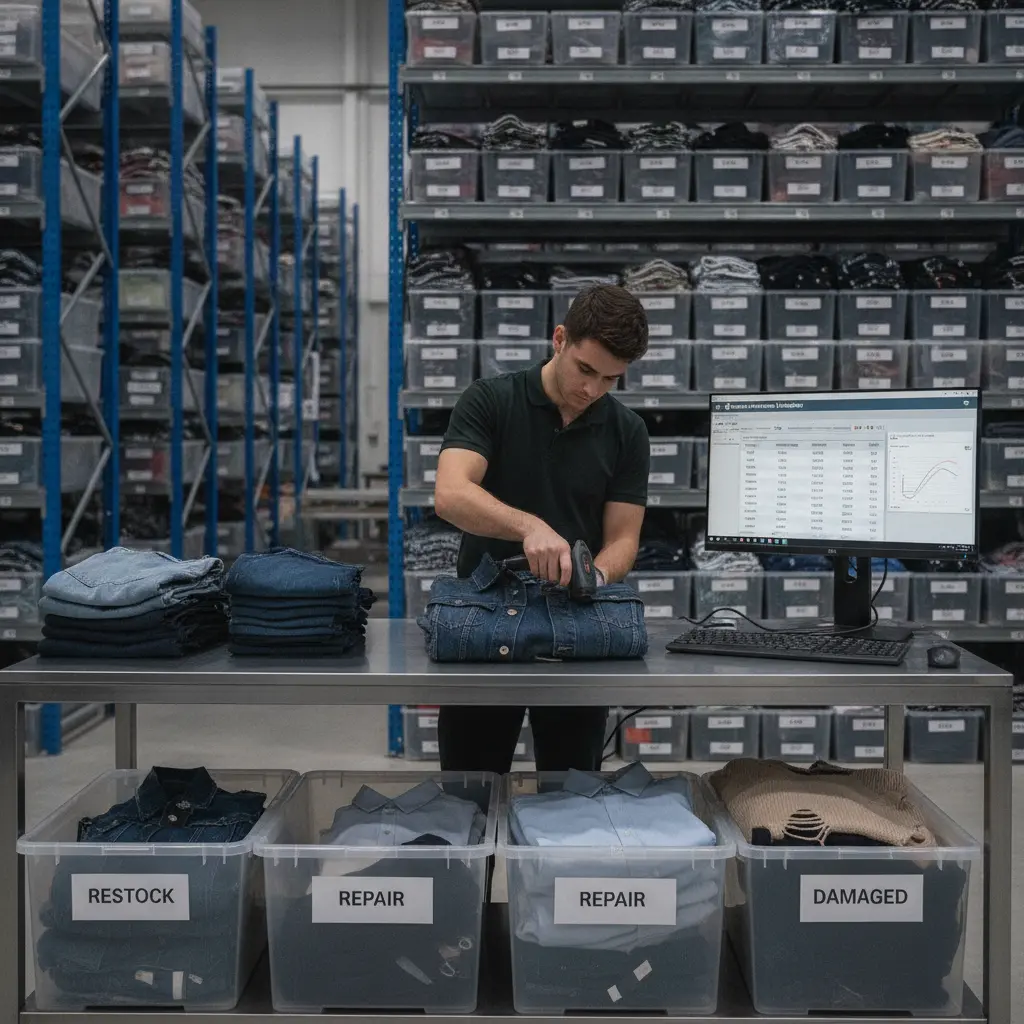
A return is not finished when the customer gets a refund. For an apparel brand, the operational finish line is later: the unit has been received, inspected, assigned a disposition, and synced back to the right inventory bucket.
That gap matters. NRF and Happy Returns projected $890 billion in U.S. retail returns for 2024, with an average ecommerce return rate of 16.9%. Shopify also notes that return processing can cost 20% to 65% of the original item value. For fashion brands managing sizes, colors, and wholesale reservations, slow return-to-restock handling turns sellable units into margin loss.
Use this checklist to tighten the returns workflow after a product arrives back at the warehouse.
What return-to-restock time means
Return-to-restock time is the time between a returned unit arriving back at your warehouse or 3PL and that unit becoming available for sale again.
For apparel, this is rarely one scan. A medium black dress may arrive in a mixed tote with five other orders. Someone has to confirm the SKU, size, color, original order, refund status, condition, packaging, hangtag, bin location, and whether the item can be sold at full price.
A useful workflow tracks each handoff: arrival, receiving scan, inspection result, disposition, restock or quarantine action, and inventory sync to Shopify, wholesale, and reporting systems.
For a brand selling across Shopify, Joor, Nuorder, and a wholesale showroom, one slow handoff can distort multiple channels. The goal is not only faster refunds. The goal is faster, cleaner inventory recovery.
Why fashion returns create inventory distortion
Fashion inventory is fragile because one style is split across variants. A crewneck with 6 sizes and 4 colors creates 24 inventory positions before you add warehouse locations, wholesale holds, preorders, or damaged stock.
Returns create distortion when those units sit between systems. Customer service may see the return as complete. Finance may see the refund issued. Shopify may show the order closed. The warehouse may still have the item in a receiving tote.
NRF and Happy Returns found that 76% of consumers consider free returns a key factor when choosing where to shop. That pressure pushes brands to accept returns quickly, but speed at the customer-facing layer does not fix the back-office inventory problem.
Common distortion patterns include sellable units sitting in a quarantine bin with no aging report, damaged items counted as available inventory, exchanges creating replacement demand before inspection, wholesale reservations taking priority while DTC returns sit unprocessed, and 3PL files arriving too late for same-day updates.
For teams already fighting overselling across sales channels, this is why returns should connect directly to apparel returns management software rather than living in spreadsheets, email threads, and delayed 3PL reports.
The ideal return-to-restock workflow: receive, inspect, disposition, restock, sync
A strong return-to-restock workflow is simple enough for warehouse teams to follow and detailed enough for operations leaders to trust the numbers.
1. Receive
Start with a receiving scan tied to the return authorization, original order, SKU, size, color, and customer account. If the unit arrives without paperwork, the workflow should still let the team create an exception record instead of placing the item in an untracked pile.
2. Inspect
Inspection decides whether the unit can go back to stock. Apparel teams should check condition, odor, stains, damage, packaging, tags, and whether the product is current-season or past-season.
The inspection result should become structured data.
3. Disposition
Disposition is the decision point. Common apparel dispositions include restock at full price, restock for outlet, hold for cleaning, return to vendor, donate, recycle, scrap, or escalate for fraud review.
A clear disposition code prevents damaged goods from inflating available stock and helps merchandising see margin loss after the sale.
4. Restock
Once a unit is sellable, it needs a location. That might be a forward pick bin, reserve storage, outlet stock, or a wholesale allocation area. The restock scan should update both quantity and location.
If your warehouse inventory process is already strained, returns will expose it. Blastramp’s guide to warehouse inventory management software for fashion brands explains how location control and scan-based workflows reduce fulfillment delays.
5. Sync
The final step is system sync. The returned unit should update the inventory source of truth, then flow to the channels that are allowed to sell it.
That may include Shopify, wholesale platforms, ShipStation, QuickBooks, BI dashboards, and planning reports. If integrations are delayed or one-way only, the unit can be physically back on the shelf while the sales team still thinks it is unavailable. Brands should review their commerce and operations integrations before return volume increases.
Checklist: data fields every returned unit needs
A return record should be specific enough that a COO can answer one question without asking departments: can this unit be sold, where is it, and what happened to its value?
Use this checklist as your baseline.
Return identity
- Return authorization number
- Original order number
- Customer or wholesale account
- Channel: Shopify, wholesale, marketplace, showroom, or manual order
- Return reason code
- Arrival date and time
Product details
- SKU
- Style name or number
- Size
- Color
- Season or collection
- Original selling price
Inspection and disposition
- Condition: new, worn, damaged, missing tags, needs cleaning, wrong item
- Packaging status
- Photo evidence for exceptions
- Disposition code
- Refund, exchange, or store credit status
Inventory control
- Current warehouse or 3PL location
- Restock location
- Inventory bucket: sellable, hold, damaged, outlet, repair, scrap
- Sync status by channel
- Date returned to available stock
KPI dashboard: restock time, sellable recovery, damage rate, markdown exposure
A return-to-restock process needs a dashboard, not just a queue. Track these four KPIs first.
Restock time
Measure the average and median time from return arrival to sellable inventory sync. Median is helpful because one messy exception can skew the average.
A practical target might be same-day restock for clean returns received before a warehouse cutoff, with exceptions reviewed within 24 hours.
Sellable recovery rate
This shows what percentage of returned units become sellable again. A low recovery rate may point to poor product descriptions, packaging issues, customer misuse, or late processing that pushes seasonal items into markdown.
Damage rate
Damage rate separates true product issues from normal buyer behavior. If one denim style has a 12% damage rate while similar styles sit at 3%, operations and product teams need to know before the next purchase order.
Markdown exposure
Markdown exposure tracks sellable units that came back too late to return at full price. A swimsuit returned in July is different from the same swimsuit inspected in September.
Shopify reports that ecommerce return rates can reach 30% for some retailers, especially in categories where fit matters. For apparel brands, a KPI dashboard turns those broad rates into operational decisions: where to staff, where to inspect faster, and where to improve product data.
Where Shopify, 3PL, warehouse, and OMS data usually break
Most return problems are not caused by one bad tool. They happen because each system sees a different version of the return.
Shopify may know the refund status. Loop may know the return reason. The 3PL may know when the package arrived. The warehouse may know the condition. QuickBooks may know the financial impact. Joor or Nuorder may have wholesale demand waiting for the same SKU.
Breaks usually happen in five places: approved returns do not send clean item-level data to the warehouse; inspection results do not update the OMS; inventory updates hit the wrong bucket or location; Shopify gets quantity back before wholesale reservations are checked; reporting shows total returns but not restock time, damage rate, or sellable recovery.
This is why a return portal alone is not enough. Customer-facing returns management software can improve the shopper experience, but the brand still needs order, warehouse, and inventory data to meet in one place.
If your team is trying to reduce return-driven stock issues, Blastramp’s guide on using inventory and order data to reduce apparel returns is a useful next read.
How Blastramp helps connect returns back to available inventory
Blastramp helps apparel brands connect returns to the inventory and order workflows that decide what can be sold next.
Instead of treating returns as a customer service task only, Blastramp supports the operational steps behind return-to-restock: item-level visibility, warehouse status, channel sync, inventory buckets, and reporting. That matters for brands running Shopify for DTC, wholesale platforms like Joor or Nuorder, ShipStation, and QuickBooks.
For an operator, the value is practical: returned units can be tracked by SKU, size, color, condition, and location; sellable items can move back into available inventory faster; damaged items stay out of available stock; and leaders can review KPIs instead of chasing updates across tools.
Blastramp HQ starts at USD $750/month, while Blastramp WMS starts at USD $1500/month. Use the Blastramp pricing page to confirm which setup matches your return volume, warehouse model, and channel mix.
If returns are creating sellable stock delays or inventory accuracy issues, request a demo to see how Blastramp can connect returns back to available inventory.
FAQ: damaged goods, exchanges, wholesale returns, Loop integration, reporting
What should happen to damaged goods in a returns workflow?
Damaged goods should move into a non-sellable inventory bucket immediately. They should not sit in general receiving or appear as available stock. Use condition codes, photos, and disposition rules so teams can see whether the unit will be repaired, discounted, donated, recycled, or written off.
How should exchanges affect return to restock?
Exchanges create two linked movements: the replacement item going out and the original item coming back. Your returns workflow should track both. If the replacement ships before the original unit is inspected, the system should still show whether the incoming item is pending, sellable, damaged, or blocked.
Are wholesale returns different from DTC returns?
Yes. Wholesale returns often involve account rules, sales rep approvals, purchase orders, invoice adjustments, and bulk cartons rather than single customer parcels. They can also affect future allocations if another account wants the same size run.
Can Loop integration help with apparel returns management software?
Loop can manage the customer-facing return and exchange flow. The bigger operational question is what happens after the item arrives. Apparel returns management software should connect Loop data with warehouse inspection, OMS status, and inventory availability so the returned unit does not get stuck between systems.
What reports should operations review weekly?
Review restock time, sellable recovery rate, damage rate, markdown exposure, exception aging, return reasons by SKU, and channel-level return volume. These reports help teams spot product issues, warehouse delays, and inventory sync problems before they turn into stockouts or markdowns.
Returns will always be part of apparel. The brands that protect margin recover sellable stock quickly, keep damaged units out of availability, and give operators one clear view of what happened.
If that is the gap in your current stack, request a Blastramp demo and see how a connected returns workflow can improve inventory accuracy from arrival to restock.