A fashion warehouse can survive on spreadsheets for a while. Then a new drop lands: 800 units in mixed cartons, wholesale preorders held back for two accounts, and customer service asking why the size small black ribbed tank still shows as available online.
That is usually when a barcode inventory management system stops feeling optional.
For fashion brands, scanning is rarely just about counting units. It is about which size, which color, which bin, which order, which return status, and which 3PL shipment owns the next move. Barcode workflows give each scan a job: receive the right stock, pick the right variant, return goods to sellable inventory safely, count bins without closing the warehouse, and leave a clear audit trail when numbers do not match.
Why scanning becomes necessary before the warehouse feels large
A brand does not need a 100,000-square-foot warehouse to outgrow manual stock work. It only needs enough SKU complexity for memory and spreadsheets to become risky.
Take a label with 40 styles, 6 sizes, 5 colors, and 2 seasons in motion. That is 2,400 possible variant records before bundles, wholesale packs, or return grades enter the picture. Ten wrong-bin picks in a launch week can turn into refunds, exchanges, oversells, and retailer frustration.
Lexi’s SERP validation found 720 US monthly searches for “barcode inventory management system,” with a CPC of $33.82. That mix signals buying intent. Operators are not only asking what barcode systems do; they are deciding whether manual work is costing more than the fix.
Common warning signs include carton quantities keyed after receiving, pickers relying on product names instead of SKU confirmation, returns sitting unscanned in totes, cycle counts with no movement history, and 3PL stock updates arriving late enough to throw off channel availability. If those issues sound familiar, the missing layer is scan-based control at the exact moments inventory changes state.
What a barcode inventory management system does
A barcode inventory management system connects physical scans to inventory records. The scanner identifies the SKU or location, the software records the action, and the inventory count updates through a defined workflow.
In apparel, that workflow has to respect variant depth. A barcode should not point vaguely to “linen trouser.” It should map to the exact SKU: linen trouser, sand, size 28, current season, and sometimes lot or carton if the brand tracks production batches.
GS1, the standards body behind UPC and GTIN identification, describes GTINs and location identifiers as product and location “fingerprints.” For fashion brands selling through wholesale, marketplaces, or retail partners, that shared identification language helps buyers, warehouses, and sales channels recognize the same item without guessing.
The software side matters as much as the label. A scanner that reads a code but does not update available stock, bin location, order status, and channel allocation is only a faster typing tool. The stronger setup ties scans into warehouse inventory management software so teams work from the same stock picture.
Receiving: catch errors at the carton label
Receiving is the best place to catch inventory errors because it is the first time purchased or produced stock becomes available to sell.
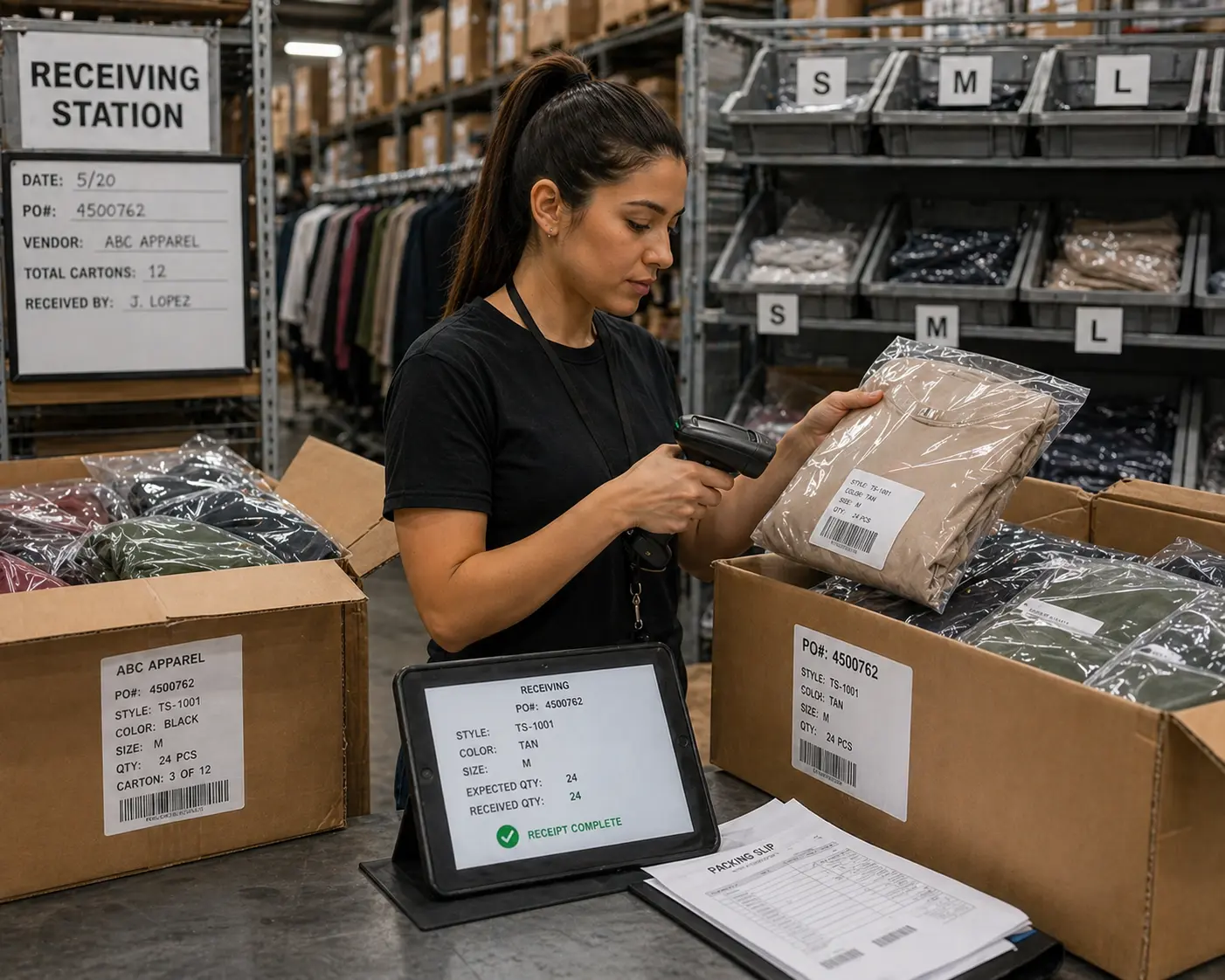
Picture 120 cartons from a cut-and-sew vendor. Each carton label lists a style code, color, size range, and quantity. Without scanning, the receiving team may open cartons, count units manually, and enter totals after the pallet is already broken down. That works until carton 47 has 18 size smalls instead of 24, or two cartons use similar black and charcoal color codes.
With barcode receiving, the team scans the carton label or item barcode, confirms the purchase order, and assigns goods to a bin, rack, quarantine area, or wholesale hold. Shortages and overages are logged during the scan flow instead of discovered after customers have ordered the stock.
Fashion teams should be able to scan by carton, unit, or SKU; confirm variants against the purchase order; route goods to sellable or inspection locations; print replacement labels; and record who received each line. If a 6,000-unit seasonal drop has just 2% of units assigned to the wrong variant, that is 120 units creating bad availability data before the first order is picked.
Picking and packing: scan the variant, not the product name
Picking mistakes are expensive because they reach the customer. For fashion brands, the most common error is not grabbing the wrong style. It is grabbing the wrong variant of the right style.
A printed pick list might say “Ribbed Tank – Black – S.” In a busy aisle, the picker sees three black ribbed tanks, two old bins, one new carton, and a nearby XS location. The product looks right. The order ships. The customer opens the package and finds the wrong size.
A scan-based pick workflow reduces that risk by forcing variant confirmation before the item moves to packing. The picker scans the bin, scans the item, and the system verifies that the SKU matches the order. If it does not match, the scanner can warn the user before the item leaves the shelf.
Mobile scanning also keeps staff from walking back to a desktop terminal every time a bin is empty or an item is misplaced. Zebra’s warehousing research reported that 60% of respondents listed labor recruitment, labor efficiency, or productivity among top warehouse challenges, while 83% expected the number of SKUs carried to rise by 2024. That is the same pressure many fashion teams feel during peak season.
If picking speed is already a bottleneck, compare scan workflows with broader inventory management software evaluation criteria, not just scanner hardware.
Returns: scan before stock goes back online
Returns can quietly damage inventory accuracy. NRF and Happy Returns projected $890 billion in US retail returns for 2024, with retailers estimating that 16.9% of annual sales would be returned. For apparel brands, fit issues, bracketing, exchanges, and seasonality all push products back into the warehouse.
The risky moment is inspection.
A returned dress may be sellable, damaged, missing a belt, tagged incorrectly, or outside the resale window. If it is scanned straight back into available inventory without a condition check, the next customer may receive a flawed unit. If it sits unscanned in a tote, the website shows less availability than it truly has.
A good return workflow separates clear states: received, inspection pending, sellable, needs repackaging, damaged, vendor claim, or write-off. Each scan changes the item’s status and creates a time-stamped record. Customer service can see whether the return arrived. Finance can see whether it became sellable again. The warehouse can put it in the right bin instead of a mystery pile near the packing bench.
If the brand uses Loop, Shopify, or shipping tools, the return scan should fit into connected order data. Blastramp’s integrations matter because barcode accuracy drops when systems store different versions of the truth.
Cycle counts: count bins without stopping fulfillment
Full physical inventory counts are disruptive. Cycle counts give fashion teams a better way to maintain accuracy: count a small set of SKUs, bins, or high-risk locations on a schedule while normal fulfillment continues.
Barcode scanning makes cycle counting practical because the counter can scan a bin, scan each item or variant, and submit the count from the floor. The system compares scanned quantities against expected quantities and flags variance immediately.
A fashion warehouse might count top sellers weekly during a new drop, high-return categories every two weeks, slow seasonal bins monthly, wholesale reserved stock before a buyer ship window, and problem locations after repeated pick exceptions.
If the medium ivory cardigan is short by six units, the team should be able to trace recent receiving, picks, returns, transfers, and manual adjustments. Without that audit trail, count variance becomes a blame exercise. With scan data, it becomes a fixable process issue.
For teams balancing B2B and DTC demand, cycle counting also protects allocation. If wholesale stock is reserved but physically mixed with ecommerce stock, one bad manual adjustment can cause overselling on one channel and underselling on another.
3PL handoffs: make transfers traceable
Working with a 3PL does not remove the need for barcode control. It raises the cost of unclear data.
A common fashion scenario looks like this: the brand receives production in-house, preps units for a wholesale account, sends overflow inventory to a 3PL, and keeps some ecommerce stock nearby for VIP customers or retail events. If transfers are tracked by spreadsheet, inventory starts to split into versions. The brand’s system says 300 units moved. The 3PL receives 288. Twelve units are somewhere between the dock, carrier, and receiving team.
Barcode transfer workflows help close that gap. The sending team scans cartons out. The receiving team or 3PL scans cartons in. Differences are logged against a transfer record, not hidden inside a future reconciliation meeting.
Carton labels matter too. If each carton has a scannable ID tied to the styles, sizes, colors, and quantities inside, the 3PL does not need to rebuild the brand’s inventory structure from scratch.
For brands balancing B2B and DTC demand, barcode transfers should connect with wholesale inventory management workflows so reserved stock, available stock, and physical stock do not drift apart.
Software requirements to check before buying scanners
Scanner hardware is only one part of the decision. The larger question is whether the system can support how fashion inventory actually moves.
Start with SKU and variant support. The system must treat size and color as inventory-level facts, not notes. If the warehouse cannot distinguish black size small from black size medium at scan time, the system will not solve the problem.
Next, check bin and location control. Barcode workflows need scannable receiving lanes, pick bins, reserve racks, return inspection tables, damaged stock shelves, and outbound staging.
Audit trail is another must-have. Every scan should record user, timestamp, SKU, quantity, location, and workflow. Manual adjustments should require a reason code.
Mobile scanning should cover receiving, picking, counts, transfers, and returns from the floor. Desktop-only workflows slow down the team. Inventory changes should also feed the systems that depend on them, including Shopify, QuickBooks, ShipStation, Joor, Nuorder, Brandboom, Loop, and other connected tools. The Shopify integration is especially relevant when barcode scans affect online availability.
If these requirements match the gaps in your current operation, review Blastramp pricing and compare the cost against labor, refunds, stockouts, and channel conflicts caused by manual inventory work.
Implementation checklist for fashion teams
Barcode projects fail when teams start with hardware before process. Start with the workflows.
Before rollout, define SKU naming rules for style, color, size, season, and pack type. Decide whether the brand will use supplier labels, internal labels, GS1 GTINs, or a mix. Give every bin, rack, return station, quarantine shelf, and staging area a location code.
Then map scan points across receiving, picking, packing, returns, cycle counts, transfers, and 3PL handoffs. Write exception rules for damaged labels, missing SKUs, short shipments, overages, and wrong-bin picks. Decide who can make stock adjustments and what reason codes they must use.
Pilot one workflow first. Receiving is often a smart starting point because clean inbound data improves every later step. Picking is another strong first use case if wrong-size shipments are hurting customer experience. Train one group, fix the workflow, then expand.
The goal is not more scans. The goal is fewer inventory arguments.
FAQ
What is a barcode inventory management system?
It is software that connects barcode scans to inventory records. In a fashion warehouse, it can confirm the exact SKU, size, color, bin, order, return, transfer, or count action behind each stock movement.
When should a fashion brand move from spreadsheets to barcode scanning?
Move when manual checks start causing wrong-size picks, return delays, stock discrepancies, channel oversells, or unclear 3PL transfers. A brand with hundreds of variants can reach that point before it considers itself large.
Do fashion brands need GS1 barcodes?
Many brands use GS1 barcodes when selling through retail partners, marketplaces, or channels that require UPCs or GTINs. Internal warehouse labels can still be used for bins, cartons, and operational movements.
Can mobile phones work for barcode inventory scanning?
Yes, if the software supports mobile scanning and the warehouse environment is not too demanding for phone cameras. Higher-volume teams may prefer dedicated scanners for speed, durability, and battery life.
How does barcode scanning help returns?
Each return scan can move the item through received, inspection, sellable, damaged, or write-off states. That prevents returned stock from going online too early or sitting offline after it is ready to sell.
make scanning part of the inventory system
Barcode scanning works best when it is built into the same inventory platform your team already uses for orders, channels, warehouse work, and reporting. If your brand is trying to control more variants, faster returns, and split DTC/wholesale stock, Blastramp can help you map the right scan workflows before another peak season exposes the gaps.
Request a demo to see how Blastramp supports barcode-driven inventory control for fashion teams.